


Fake Broken Screen Halloween Prank Wallpapers for Friends
Fake Broken Screen Wallpapers deliver instant prank setups with high-definition cracked and glitched images.
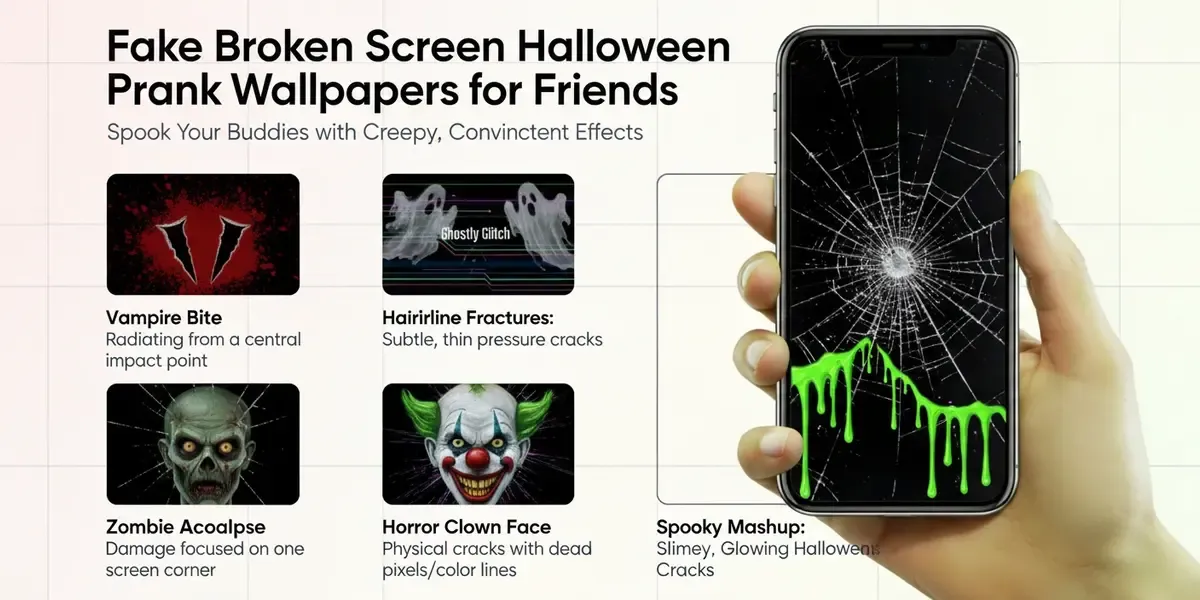
The collection of Fake Broken Screen Wallpapers allows instant activation of cracked screen effects. People apply these images to create convincing pranks that work across multiple device types without installation. Since the images come in 4K resolution they maintain quality when expanded to full screen. This approach gives reliable results for Halloween events.
How Do I Start the Prank?
Users must first navigate to the tool or search for the specific term. The process requires three steps that ensure quick setup and easy removal.
-
Visit brokenscreen.org via using your any web browser.
-
Choose the image of the broken screen you like and click it.
-
Press
Escto stop the prank and turn off full screen mode. Each step prevents unnecessary complications during the activity.
Since the sequence comes directly from tested instructions it reduces errors for first time users.
What Types of Screens Are Available?
Several visual styles appear in the collection for different prank needs. The options include cracked screens that show fracture lines across the display. Glitched screens add digital distortion with colorful artifacts. Broken screens simulate complete hardware failure with realistic shards. Dead pixels create clusters of non working dots in key areas. Shattered glass effects mimic physical impact damage. Since these variations give choices people can match the image to the target device and situation.
Which Devices Can I Use?
The prank works on all major devices without special preparation. Phones accept the image through wallpaper or screensaver settings. Tablets display the effect in full screen during casual use. Laptops allow the picture as a desktop background for office surprises. TVs show the graphic when set as a temporary screen image. Since each device supports standard image formats the prank transfers easily between them. This flexibility makes the tool practical for various Halloween scenarios.
How Does the Full‑Screen Mode Work?
Clicking an image opens it in full screen mode for the prank. The picture fills the entire display and hides all normal interface elements until interrupted. Since the effect remains active people experience the full visual impact. Press Esc to stop the prank and turn off full screen mode. This single command returns the device to normal operation immediately. The design keeps the process simple for quick deployment and removal.
Where to Find High‑Definition Images?
The main collection houses the high definition options. Pictures of Fake Broken screen in High-Definition, 4K gives access to sharp visuals. Since each image reaches 4K resolution the details stay clear even on large monitors. People select from multiple variations that maintain quality at full scale. This resolution level prevents pixelation that could ruin the illusion. The organized gallery helps users locate suitable files without delay.
Download ImagesHow to Install on a Windows PC?
The prank works on Windows desktops through simple wallpaper changes. Locate the saved image file on the computer. Set the picture as wallpaper while the colleague steps away. Observe the reaction and reveal the joke soon after. Since the method avoids permanent changes it remains safe for workplace use. Acting slightly panicked adds credibility until the reveal moment. This sequence follows established prank patterns that minimize disruption.
How to Install on a Mac?
Mac users can also apply the wallpaper without special tools. Download the chosen image to the local storage first. Open System Preferences and select the Desktop option. Choose the image file and confirm the new background setting. Since the change reverses easily users avoid any lasting effects. The process takes less than one minute on current systems. This method aligns with standard Mac customization options.
How to Install on a Mobile Phone?
Phones and tablets support the prank through built in screensaver settings. Download the image to the device photo library first. Go to Wallpaper settings and choose the new image file. Confirm the selection to activate the display change. Since personal devices update instantly the prank deploys during normal use. The steps require no third party applications. This approach works for both Android and iOS platforms.
How to Share the Prank Link with Others?
The link can be shared for group fun. People often send the address so friends can try the tool. Copy the URL into a message for quick access. Send via messenger to reach multiple contacts at once. Post on social media reaches a wider audience. Since the source invites sharing the link the practice spreads the entertainment. This distribution method lets others join the activity easily.
What Are the Most Popular Prank Scenarios?
| Scenario | Target Device | Key Reaction |
|---|---|---|
| Pranking family | TV | Shock followed by relief |
| Pranking colleague | Computer | Baffled expression then laughter |
| Pranking friends | Phone or tablet | Dramatic surprise and playful response |
Each scenario works because it catches the target off guard in familiar settings. Family pranks on the TV create household memories. Colleague pranks add levity to the workday. Friend pranks test bonds through shared humor. Since the reactions stay positive these setups remain popular choices.
Where Can I Find More Halloween‑Themed Wallpapers?
The broader collection connects to Halloween themes beyond broken screens. Pumpkins offer classic orange and carved designs. Ghosts provide floating spectral figures. Skeletons show bony structures in various poses. Spiders create web filled scenes. Skulls deliver dark and eerie visuals. Candy adds colorful sweet elements. Party designs bring festive celebration atmospheres. Each theme matches seasonal decorations.
You can find more Halloween‑Themed Wallpapers from most popular image store like www.pexels.com, zedge.net, unsplash.com.
What Are the Image Resolution Requirements?
High resolution images make the prank most realistic. Minimum 3840 by 2160 pixels ensures sharp detail on modern screens. Full screen display recommended maximizes the visual impact. Since lower resolutions show artifacts they reduce effectiveness. The 4K standard prevents blurring during expansion. This specification maintains the illusion across different device sizes. Proper resolution strengthens the overall prank quality.